
8.0 hAcme · Platform work
Logged
MCP server for FreshBooks
Log your timesheet by just asking.
Connect your AI agent to FreshBooks. Ask which days are missing, log a whole week around PTO, or move an entry to the right project — in plain language, with the writes kept deliberately narrow.
10 toolsread, write, discover
OAuth2tokens in your keychain
Timezone-correctdays, weeks, months
WEEK OF JUL 20
Timesheet status
22 / 40 h
8.0 hAcme · Platform work
Logged
6.0 h2.0 h short of expected
Under
—No entries found
Missing
—Hasn't happened yet
Future
Boundaries computed in America/Denver
2 days need attention
One conversation across
YOUR AGENT→MCP SERVER→FRESHBOOKS API
INSTALL
One-click Claude Desktop extension.
~10 minute setup
Drag the .mcpb bundle into Claude Desktop, paste your FreshBooks app credentials, and authorize once. Docker and local Python are supported for Claude Code, other MCP clients, and headless use.
Use cases
Where it saves the hour.
Timesheets are small, repetitive, and easy to forget. This turns them into a sentence at the end of the week.
The Friday catch-up
Ask "which days am I missing this month?" and get a per-day breakdown — logged, under-logged, or missing — with days that haven't happened yet marked as future instead of overdue.
Logged12 d
Missing5 d
Future3 d
Weekends are never counted. Nothing is written by a status check.
Log a week around PTO
"8 hours Monday–Thursday on Acme, PTO Friday." Off-days are skipped, days already logged are left alone, and weekends never get an entry.
See the safeguards →Fix an entry after the fact
List the entries for a week, then move one to a different project, correct the hours or note, or flip the billable flag — without touching the fields you didn't mention.
Browse the tools →Confirm before writing
The agent looks up your projects, clients, and services and asks which one you meant. log_time has no default project — it refuses to guess.
Preview before committing
Run any logging request as a dry run first. You get the exact plan — dates, hours, project, note — and approve it before a single entry is created.
See the parameters →How it works
An agent with a short, careful leash.
The MCP server treats the calling agent as untrusted. Hours are clamped, dates validated, day counts capped, and the identity is locked to whoever authorized — you can't log time as someone else.
Read the setup guide →-
01
Authorize onceOAuth2 against your own private FreshBooks app. Rotating refresh tokens are persisted before use, so a refresh can never break the chain.AUTH
-
02
Ask in plain languageYour agent picks the tool — a status question reads, a logging request writes. Day, week, and month boundaries resolve in your configured timezone.AGENT
-
03
Confirm the targetDiscovery tools list projects, clients, and services so the agent can ask which one you meant before anything is created.CONFIRM
-
04
Write safelyDry-run previews, automatic skipping of days already logged, weekends excluded, and a hard cap on how many days one call may touch.WRITE
Tools
Ten tools, three jobs.
Read your timesheet, write to it, and discover what to write against. Every tool's logic is a plain function with the API client injected, so it's unit-tested without the MCP runtime.
check_timesheet
Logged, under-logged, and missing weekdays for a day, week, or month — plus totals and a text summary. Future weekdays are never flagged.
log_time
Log X hours per weekday against a project, with PTO exclusions, a dry-run preview, and automatic skipping of days that already have entries.
list_time_entries
Individual entries with their ids, dates, hours, project, note, and billable flag — the way to find the entry you want to change.
update_time_entry
Edit one entry by id: move it to another project, fix the hours or note, or set billable. Fields you don't pass are preserved.
list_projects
Active or all projects, optionally filtered by a search query, so the agent can confirm the target before logging.
list_clients · list_services
Clients for billable entries and services for the billing rate — the two ids FreshBooks asks for when work is billed.
start_auth · finish_auth
One-time authorization from inside the chat: the server returns a URL, you paste back the code, and the tokens land in your OS keychain.
auth_debug
Fingerprints the loaded credentials — no secrets — so a failing authorization can be diagnosed without pasting anything sensitive.
A real run
What the agent reports back.
A backfill of two weeks plus the current week, verified against a fresh month view — with the days that haven't happened yet deliberately left alone.
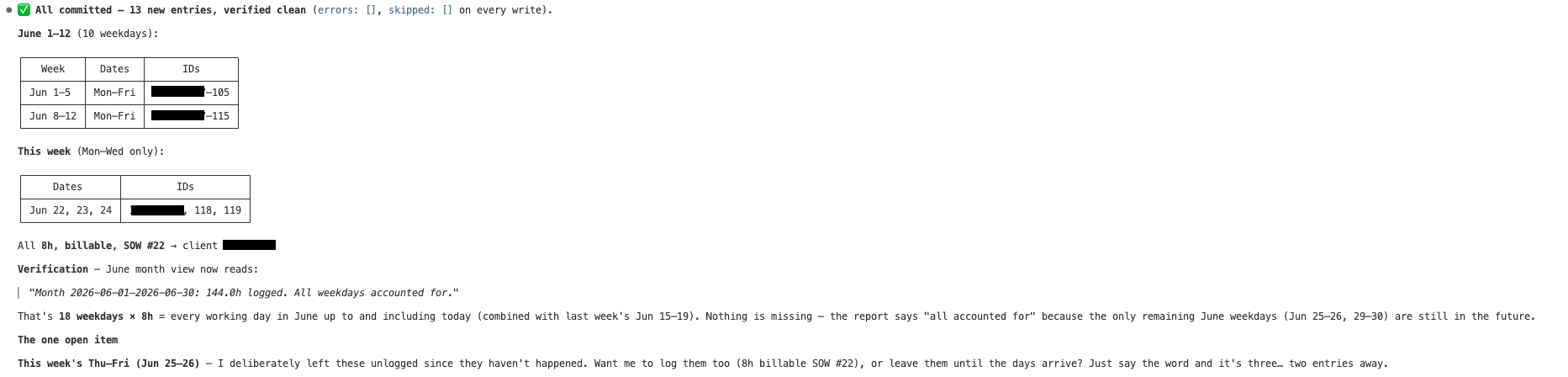
Client and entry ids redacted. Open the image for full size. The verification step is a second read through check_timesheet — the run confirms its own writes.
Security
Your credentials never touch the model.
The agent gets tools, not tokens. Secrets stay in the OS keychain, requests are validated server-side, and token values are masked everywhere they could be logged.
- ◆Keychain by defaultEncrypted-file fallback uses Fernet with the key supplied separately,
0600permissions, atomic writes. - ◆Correct token rotationEach refresh returns a new refresh token; it's persisted under a lock before use.
- ◆Server-side validationHours clamped, dates checked, day counts capped, identity locked to the authorized user.
- ◆No secret leakageToken payloads and responses are never logged;
TokenSetmasks itself inrepr.
Get started
Running in about ten minutes.
Create a private FreshBooks app, install the Claude Desktop extension, and authorize once. Docker and local Python instructions are in the same guide.